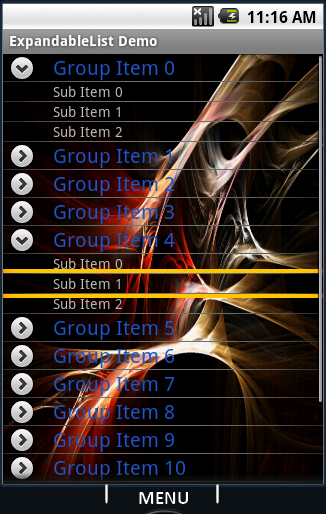
Expandable ListView in ANDROID
Jumat, 01 Maret 2013
0
komentar
java.class

expandablelistview.xml:
public class Expandablelistview extends ExpandableListActivity {
    @Override
    public void onCreate(Bundle savedInstanceState) {
        super.onCreate(savedInstanceState);
        setContentView(R.layout.expandablelistview);
        SimpleExpandableListAdapter expListAdapter =
                           new SimpleExpandableListAdapter(
                    this,
                    createGroupList(),
                    R.layout.group_row,
                    new String[] { "Item" },
                    new int[] { R.id.row_name },
                    createChildList(),
                    R.layout.child_row,
                    new String[] {"Sub Item"},
                    new int[] { R.id.grp_child});
            setListAdapter( expListAdapter );
    }

    // hash map for row

    private List createGroupList() {
      ArrayList result = new ArrayList();
      for (int i = 0; i < 15; ++i) { // 15 groups........
      HashMap m = new HashMap();
      m.put("Item", "Item " + i); // the key and it's value.
      result.add(m);
  }
  return (List) result;
 }

    /* creatin the HashMap for the children */

    private List createChildList() {
        ArrayList result = new ArrayList();
        for (int i = 0; i < 15; ++i) {
            ArrayList secList = new ArrayList();
            for (int n = 0; n < 3; n++)
            {
                HashMap child = new HashMap();
                child.put("Sub Item", "Sub Item " + n);
                secList.add(child);
            }
            result.add(secList);
        }
        return result;
    }


    public void onGroupExpand(int groupPosition) {
        try
        {
            System.out.println("Group exapanding
                   Listener => groupPosition = "
                          + groupPosition);
        } catch (Exception e) {
            System.out.println(" groupPosition Errrr +++ "
                  + e.getMessage());
        }  } }
child_row.xml:
<?xml version="1.0" encoding="utf-8"?>
<LinearLayout xmlns:android="http://schemas.android.com/apk/res/android"
    android:orientation="vertical"
    android:layout_width="fill_parent"
    android:layout_height="fill_parent"
    >
 <ExpandableListView android:id="@+id/android:list"
               android:layout_width="fill_parent"
               android:layout_height="fill_parent"
               android:background="@drawable/bkg"/>

     <TextView android:id="@+id/android:empty"
               android:layout_width="fill_parent"
               android:layout_height="fill_parent"
               android:text="No items"/>
</LinearLayout>
group_row.xml
<?xml version="1.0" encoding="utf-8"?>
<LinearLayout xmlns:android="http://schemas.android.com/apk/res/android"
    android:orientation="horizontal"
    android:layout_width="fill_parent"
    android:layout_height="wrap_content">
    < TextView android:id="@+id/grp_child"
         android:paddingLeft="50px"
         android:focusable="false"
         android:textSize="14px"
         android:textStyle="normal"
         android:layout_width="150px"
         android:layout_height="wrap_content"/>
</LinearLayout>
<?xml version="1.0" encoding="utf-8"?>
<LinearLayout xmlns:android="http://schemas.android.com/apk/res/android"
    android:orientation="horizontal"
    android:layout_width="fill_parent"
    android:layout_height="fill_parent">

    <TextView android:id="@+id/row_name"
         android:paddingLeft="50px"
         android:textSize="20px"
         android:textStyle="normal"
         android:layout_width="320px"
         android:layout_height="wrap_content"/>

</LinearLayout>
Baca Selengkapnya ....


