Google Wallet Card

Posted by Unknown Rabu, 20 November 2013 0 komentar
Google Wallet users in the US can now get a physical card from Google. It's free, but you need to verify your identity, which means you'll have to provide more information to Google: the last four digits of Social Security Number (SSN) or Individual Taxpayer Identification Number (ITIN) and more.

"The Google Wallet Card is a physical prepaid debit card that allows you to access your Wallet Balance in the real world, at ATMs, banks, and wherever MasterCard® Debit is accepted. If you're in the US, and you have already verified your identity, you can request a Wallet Card from the desktop site at wallet.google.com, or from the mobile app. Once you receive and activate it, you'll be able to pay with the Wallet Card at online and physical stores that accept MasterCard® Debit, and make cash withdrawals at ATMs or banks."


Android Police reports that "Google says the card should be delivered to interested parties in 10-12 days". It's US-only, there are no fees to order or activate the card and the issuer of the card is The Bancorp Bank, which provides private label banking services.

Google provides a use case for the debit card: "Your roommate finally paid you back for dinner through Google Wallet, and you want to use that money right away to pay for groceries this week. Now, you can use the new Google Wallet Card to spend the money instantly, either by purchasing in stores or by withdrawing cash at ATMs, without having to wait for money to transfer from your Google Wallet Balance to your bank account."

Other advantages: free notifications on your mobile phone and no monthly/annual fees to use the card (there are some fees, though).

An important limitation: "you cannot use the Google Wallet Card outside the US right now".


Baca Selengkapnya ....

Introducing Google Play Newsstand - one place for all your news

Posted by Unknown 0 komentar
Staying up on the news can be a daunting task. You have to go to a different website or app for each of your favorite magazines, newspapers and blogs. One place to read and discover all of this would be a lot simpler.

Today we’re launching Google Play Newsstand, a new app for your Android phone or tablet which brings together all of your favorite news sources in one experience. Newsstand puts the news you care about most front and center and presents stories that interest you based on your tastes. The more you read the better it will get. You can subscribe to magazines, newspapers, blogs and news sites and we’ll format and optimize them all for reading on your tablet or phone. With the swipe of a finger, you can browse full length articles, with beautiful images, audio and video right inside the app. You can access these articles even when you’re offline or bookmark them to read later.


Google Play Newsstand offers more than 1,900 free and paid, full length publications that you can subscribe to or follow. Some of these include:

  • Newspaper Subscriptions: Full-length content from some of the world’s top newspapers including The Australian, The Financial Times, Los Angeles Times, The National Post, The New York Times and The Wall Street Journal
  • Magazines: Hundreds of HD magazines like Better Homes & Gardens, The Economist, Esquire, Fast Company, Forbes, Game Informer, The New Yorker, Rolling Stone, Shape, TIME, Vanity Fair and WIRED, from publishers like American Media Inc., Condé Nast, Hearst, Meredith, TIME Inc., and more. 
  • Blogs: Your favorite blogs like Apartment Therapy, Colossal, Cool Hunting, Flavorpill, Saveur Daily, TMZ and The Verge. 
  • News sites: Leading news sites like ABC News, The Atlantic, CBS Sports, CNET, The Daily Beast, Huffington Post, The Guardian, NPR, Reuters, The Telegraph, and more.


If you’re in the US, Canada, UK or Australia, the Google Play Magazines app will be upgraded to Google Play Newsstand over the next few days. In all other countries, you can download the Play Newsstand app for your Android phone or tablet from Google Play. If you’re a Google Currents user, you can upgrade to Play Newsstand by downloading the new app. You’ll find all of your favorite news sources will be transferred and ready to read the minute you open it.

Google Play is all about bringing you great content on your phone and tablet. No matter what your interests, there’s something for everyone in Newsstand.

Posted by Mussie Shore, Product Manager for Google Play Newsstand

Baca Selengkapnya ....

Google+ Shows Line Counter for Long Posts

Posted by Unknown Selasa, 19 November 2013 0 komentar
Google+ now shows the number of lines that are collapsed next to "read more", so you can see if the post is long. If the post has less than 10 lines, Google doesn't display the number of lines.


Here's an example of a long Google+ post: "read more (50 lines)".


Google+ shows a similar line counter for long comments:


These are only displayed in the stream and profile pages, not for the post pages.

Baca Selengkapnya ....

Google Asks Users to Disable Ad Blocking for Its Sites

Posted by Unknown 0 komentar
It looks like Google started to show warnings if you use AdBlock or AdBlock Plus, the most popular ad blockers (they have more than 50 million users). A reader from Brazil noticed this message: "Oh no, it seems like you are blocking Google's ads. These ads pay for Google products that people use every day. It's easy to deactivate ad blocking just for Google. And it won't change your ad blocking settings or other settings".

The message links to a filter that includes a long list of exceptions like "@@||www.google.com^$document" and "@@||maps.google.com^$document".


Here's a screenshot of the Google whitelist filter (it actually includes more domains):


This is pretty weird, considering that the ads were not blocked, as you can see in the screenshot. Google ads are not blocked by default in AdBlock Plus, since they're considered "acceptable ads". Some sites have speculated that Google paid AdBlock Plus to whitelist its ads, but that's not very clear.

Google Discovery also reported about this back in May, so it looks like the experiment is limited to Google Brazil, at least for now.

{ Thanks, Marcos Alexandre. }

Baca Selengkapnya ....

YouTube Tests Channel Cards

Posted by Unknown Minggu, 17 November 2013 0 komentar
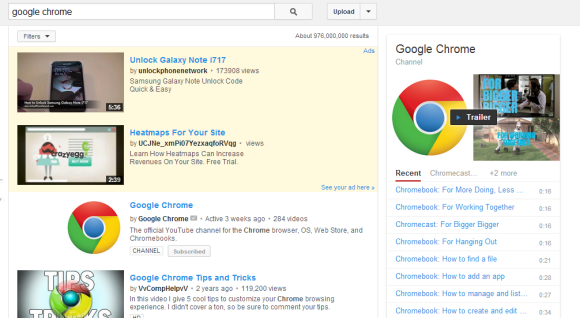
After adding music cards and testing cards for shows, YouTube experiments with cards for channels. They're displayed in the right sidebar of the search results page and show the latest videos from the channel and some of its playlists.

Here's an example for Google Chrome. The channel is still included in the list of search results.


Here's how you can enable the experimental feature. If you use Chrome, Firefox, Opera, Safari or Internet Explorer 8+:

1. open youtube.com in a new tab

2. load your browser's developer console:

* Chrome or Opera 15+ - press Ctrl+Shift+J for Windows/Linux/ChromeOS or Command-Option-J for Mac

* Firefox - press Ctrl+Shift+K for Windows/Linux or Command-Option-K for Mac

* Internet Explorer 8+ - press F12 and select the "Console" tab

* Safari 6 - if you haven't enabled the Develop menu, open Preferences from the Safari menu, go to the Advanced tab and check "Show Develop menu in menu bar". Close Preferences and then press Command-Option-C to show the console.

* Opera 12 - press Ctrl+Shift+I for Windows/Linux or Command-Option-I for Mac, then click "Console".

3. paste the following code which changes a YouTube cookie:

document.cookie="VISITOR_INFO1_LIVE=2IS0PWox26Q; path=/; domain=.youtube.com";window.location.reload();

4. press Enter and close the console.

Some examples of searches: [google], [apple], [comedy central].

To go back to the regular interface, use the same instructions, but replace the code from step 3 with this one:

document.cookie="VISITOR_INFO1_LIVE=; path=/; domain=.youtube.com";window.location.reload();

{ via Rubén. }

Baca Selengkapnya ....

Blue YouTube

Posted by Unknown Jumat, 15 November 2013 0 komentar
I like blue, so I was pleasantly surprised to see that YouTube made some UI elements blue (#2793e6): the like button and the line below the number of views. Maybe someone was unhappy that Android KitKat removed all the blue icons and decided to compensate in other ways or maybe it's an attempt to calm YouTube users and make them stop posting silly comments.


Baca Selengkapnya ....

Folders in Chrome's App Launcher

Posted by Unknown 0 komentar
Chrome's latest Dev channel release lets you create folders in the app launcher. If you use Chrome 33 (Dev, Canary) or Chromium 33 for Windows, you can paste this in the address bar:

chrome://flags/#enable-app-list-folder

Then click "Enable" next to "Enable the app list folder" and then click the "Relaunch now" button at the bottom of the page to restart the browser and enable the experimental feature.


"If enabled, user will be able to create app list folder by drag-and-drop," informs Google. It works just like in Android: drag one app on top of another to create a folder, then drag other apps to the folder.


Here's the Google folder from the screenshot above:


It's a simple feature that lets you organize your apps and reduce clutter. Unfortunately, it doesn't work well, at least not for me. After creating the folders, Chrome quickly removed them. Maybe it has something to do with syncing or maybe there are other bugs. It's an experimental feature, so I can't complain.

"These experimental features may change, break, or disappear at any time. We make absolutely no guarantees about what may happen if you turn one of these experiments on, and your browser may even spontaneously combust. (...) Please proceed with caution."

{ Thanks, Silviu. }

Baca Selengkapnya ....
Trik SEO Terbaru support Online Shop Baju Wanita - Original design by Bamz | Copyright of android populer.