The Feed Reading Playground Is Now Open

Posted by Unknown Sabtu, 22 Juni 2013 0 komentar
Google used this many times last year: "the playground is open". That's one of the most important things about Android: it's open source and any company can use it. One of the definitions of "open" is "accessible to all, unrestricted as to participants".

The playground for feed readers is now open. Google Reader's demise levels the playing field in the feed reading world. Now there are more competitors, there's more innovation, there are new platforms for distributing feeds, new interfaces. Suddenly, feed readers are a hot topic. Until now, Google Reader was the dominant service and platform, but Google didn't know what to do with it. Google Reader stopped adding new features back in 2010 and it was in maintenance mode ever since then. Few dared to challenge its position and most new feed readers were only Google Reader clients.

Google Reader's disappearance is Google's best idea for saving RSS. From stagnant to vibrant in 3 months - Google Reader's demise helped RSS more than the last 3 years of silence. The playground is now open.


And for those who are sad that Reader will soon be gone - don't worry, there's a bit of Google Reader in any feed reader that has launched in the past 3-4 years or will launch in the near future. Maybe it's time to get a better Reader, even if not from Google...

Baca Selengkapnya ....

YouTube's Smarter Video Player

Posted by Unknown 0 komentar
YouTube had a feature that allowed you to stop buffering a video. You right-clicked a video, selected "stop download" and YouTube no longer downloaded the video. This was especially useful for paused videos and long videos.

The feature is no longer available. I've tried both the Flash player and the HTML5 player.


The truth is that this feature is no longer needed because buffering stops when you pause a video. Try this: open a random YouTube video, wait a few seconds and then pause the video. Even after 5 minutes, YouTube's seek bar will look the same.


YouTube has a smarter way to download videos that uses adaptive streaming and only downloads what's needed. That's only the case for the Flash player: the HTML5 player works just like before.

Here's what happens when you play a video right now: YouTube downloads a lot of different sized text files that are merged.


The HTML5 player and the old Flash player download a single video file. The new Flash player slices the video and requests each slice separately (the project was referred internally as "sliced bread"). What's the point?

"The new player is keeping close eyes on the speed and health of your internet connection, explained [YouTube's Andy] Berkheimer: 'It's continuously monitoring the bandwidth and the throughput it is seeing,' he said, adding that it also keeps tabs on the size of your player. Are you watching a video in full screen? Then you can expect YouTube to send you more bits, as long as your connection is fast enough. (...) YouTube tends to be more aggressive in sending out higher-quality video, and then scales down the video if necessary, Berkheimer explained. The site also makes use of the fact that you often watch more than one YouTube video in a row, and optimizes your bit rate across an entire session. The results of these efforts have been encouraging. YouTube has seen buffering reduced by 20 percent since it launched adaptive streaming for its desktop player," reported GigaOM.

Adaptive streaming will come to the HTML5 player, then to the mobile players and the TV players. At some point, the settings that allow you to change video quality may disappear because they're no longer needed. Instead of having to adjust the video quality, YouTube could automatically change it for you depending on your connection speed.

Here's a video from Google I/O that offers more technical information about adaptive streaming, a feature that was implemented in 4 years:


Baca Selengkapnya ....

Leaked images of iPhone 5S, Galaxy Note III

Posted by Unknown 0 komentar
As the second half of the year approaches, the technology industry is abuzz with rumours of the two hottest upcoming smartphones - Apple iPhone 5S and Samsung Galaxy Note III. The Cupertino-based tech giant is widely expected to launch its next flagship smartphonet in the third quarter, while its fierce South Korean rival will launch the top-end phablet in August. However, both the devices have once again emerged in leaked pictures before their official launch.


read more from :
http://timesofindia.indiatimes.com/tech/tech-news/hardware/Leaked-images-of-iPhone-5S-Galaxy-Note-III/articleshow/20714181.cms

Baca Selengkapnya ....

YouTube Collections

Posted by Unknown 0 komentar
Here's a very cool YouTube feature you should try: collections. It's a simple way to group multiple subscriptions, so you can quickly check the latest videos related to a topic. Let's say you subscribe to the Google channel, the Chrome channel and the Nexus channel. You can create a Google collection that includes all these channels.

"To make a brand new collection or edit an existing one, visit the Subscription Manager, which you can navigate to by clicking Manage subscriptions from the left side of your YouTube page. Click the 'Create new collection button'. Name your collection and select the channels you'd like to include in your collection," explains YouTube. Use the search feature to find the right channels.


Collections are placed at the top of the subscriptions list in the YouTube sidebar, so it's easy to find them. They have a small arrow button that lets you expand the collection and see each subscription. If a subscription is added to collection, you'll no longer see that subscription in the sidebar without expanding collections. It's a great way to organize your subscriptions.


Baca Selengkapnya ....

Gmail's Quick Action Button for YouTube Messages

Posted by Unknown 0 komentar
A few weeks ago, Gmail started to show a small button next to some email messages from YouTube. Click the "view video" button and you can watch the video in a new tab without even reading the message. This is one of the first built-in Gmail actions.


This only works for notifications received when a YouTube channel uploads a new video. If you visit this page when you're signed in, you can check "Email me about new uploads" next to your favorite channels.


{ Thanks, Yu-Hsuan Lin. }

Baca Selengkapnya ....

Watch Now: a New YouTube Experiment

Posted by Unknown Jumat, 21 Juni 2013 0 komentar
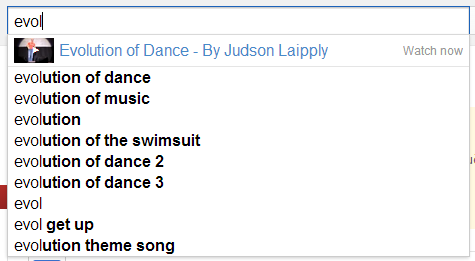
YouTube tests a time-saving feature that suggests videos when you're typing a query. When there's a video that strongly associated with your search, YouTube places a link to the video above the search suggestions list and highlights it with this label: "watch now".

For example, when you type the first 4 characters from [evolution of dance], YouTube realizes that you want to watch this video.


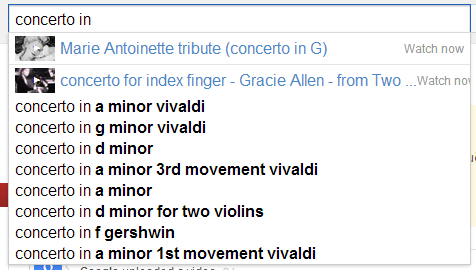
For some reason, YouTube suggests videos even when it's not obvious what you want to watch. For example, typing "concerto in" triggers 2 suggestions.


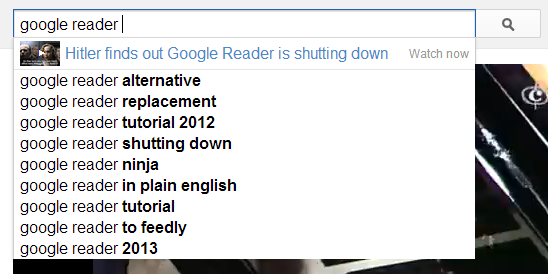
There's also this:


Here's how you can enable the experimental feature. If you use Chrome, Firefox, Opera, Safari or Internet Explorer 8+:

1. open youtube.com in a new tab

2. load your browser's developer console:

* Chrome - press Ctrl+Shift+J for Windows/Linux/ChromeOS or Command-Option-J for Mac

* Firefox - press Ctrl+Shift+K for Windows/Linux or Command-Option-K for Mac

* Opera - press Ctrl+Shift+I for Windows/Linux or Command-Option-I for Mac, then click "Console"

* Safari - check this article

* Internet Explorer - press F12 and select the "Console" tab.

3. paste the following code which changes a YouTube cookie:

document.cookie="VISITOR_INFO1_LIVE=k2M7rSHFQi4; path=/; domain=.youtube.com";window.location.reload();

4. press Enter and close the console.

{ Thanks, Long Nguyen. }

Baca Selengkapnya ....

Google Mine

Posted by Unknown 0 komentar
Google prepares a new service that's called Google Mine. It's integrated with Google+ and it's a way to keep track of the items you own or you'd like to have and share some of them with your circles. Right now, the service is tested internally at Google.

"Google Mine lets you share your belongings with your friends and keep up to date with what your friends are sharing. It enables you to control which of your Google+ Circles you share an item with. It also lets you rate and review the items, upload photos of them and share updates on the Google+ Stream where your friends get to see and comment on them."


Google Mine lets you organize the things you own, use, wish for, and more: gadgets, clothing, electronics, DVDs, cars, bikes or anything!

It also enables social interactions around them with your Circles using Google+:

* Catalog your belongings, track what you have
* Review your belongings for your friends to see
* Control who sees what, track conversations
* Send requests to borrow or try out friends' stuff
* Share stuff you wish for, get recommendations
* Share stuff you are giving away, find takers
* Follow, browse, search stuff that friends share

There's also an Android app, currently available in Bazaar, Google's internal Play Store.


Here are some messages used by Google Mine. As you can see, the service lets you enter a lot of information about your objects. For example, you can change the status of an object to "lent", "given away", "got it back", "lost it", "had in the past". You can post videos about the object, write reviews, add it to a wishlist and maybe others can buy it using Google Shopping. You can also check popular items and the items others have shared.


After adding an object, Google shows this message: "You have just started using Google Mine and have added some items to your collections. Now, you can let your friends know by posting to your Google+ Stream."

You can ask other people to send you their objects: "You are starting a request for an item. Google Mine will enable you to communicate on this request with the receiver by creating a post to your Google+ Stream, visible only to you and the receiver."

You can also:

* Search for stuff people have shared on Mine.
* See instant matches for your stuff, and the people in your circles.
* Use What's Hot to follow what others are sharing.
* Organize and share your stuff as lists.

Another cool feature: a 3D viewer called Katamari that uses WebGL to shows your objects.

Some icons used by Google Mine:


{ Thanks, Florian K. }

Baca Selengkapnya ....
Trik SEO Terbaru support Online Shop Baju Wanita - Original design by Bamz | Copyright of android populer.