Export Gmail and Google Calendar Data

Posted by Unknown Kamis, 05 Desember 2013 0 komentar
Google Takeout now lets you export your calendars and it will soon add a similar feature for Gmail. The calendar exporting feature is not new - you could find it in the Google Calendar settings, but it's nice to see that Google Takeout gets more comprehensive and adds support for new services.

The Gmail exporting feature is completely new and it will be gradually released next month. It will let you download a big MBOX file you can import in mail clients like Outlook, Thunderbird or Apple Mail. You can also use this feature to backup your Gmail messages and read them offline.
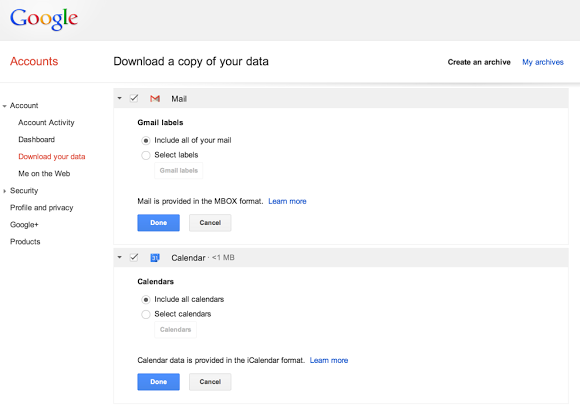

"You can download all of your mail and calendars or choose a subset of labels and calendars. You can also download a single archive file for multiple products with a copy of your Gmail, Calendar, Google+, YouTube, Drive, and other Google data," informs Google.

Baca Selengkapnya ....

Download a copy of your Gmail and Google Calendar data

Posted by Unknown 0 komentar


Having access to your data and being able to take it with you is important, especially if that data contains precious memories like old love letters, your first job offer, or that 100-message thread discussing the merits of various cat videos. Starting today we're rolling out the ability to export a copy of your Gmail and Google Calendar data, making it easy to back up your data or move to another service.

You can download all of your mail and calendars or choose a subset of labels and calendars. You can also download a single archive file for multiple products with a copy of your Gmail, Calendar, Google+, YouTube, Drive, and other Google data.
The ability to download your Gmail messages will be rolled out over the next month while Calendar data is available to download for everyone today.


Baca Selengkapnya ....

The Old Google Contacts, No Longer Available

Posted by Unknown 0 komentar
The old version of Google Contacts was available at www.google.com/contacts_v1, but now it redirects to the standard version. It was a much simpler site that worked better on a mobile phone or tablet and it had more accessibility features for screenreader users.


You can still use the basic HTML Google Contacts available at https://mail.google.com/mail/h/?v=cl.

{ Thanks, +Katty Geltmeyer. }

Baca Selengkapnya ....

The power of Search, now across apps

Posted by Unknown Rabu, 04 Desember 2013 0 komentar
A task as simple as choosing a movie to see can actually be complex — and the information you want can be in several different places, often in apps. You might get your trivia from IMDb, the box office stats from Wikipedia and ratings from Rotten Tomatoes. Starting today, Google can save you the digging for information in the dozens of apps you use every day, and get you right where you need to go in those apps with a single search. Google Search can make your life a little easier by fetching the answer you need for you — whether it’s on the web, or buried in an app.

Getting you there faster
Let’s say you’re getting ready for the holidays but can’t remember the name of that classic Christmas movie you want to show your children. Now, you can use Google search to find the movie and learn more about it in one of your favorite apps.

Helping you find just the right app
Sometimes, the best answer for a search can be an app. Say you want to explore downhill skiing — now, you can just ask Google for downhill skiing apps and get a collection of useful apps.


These new features are rolling out now on Android (through the Google Search app or directly in Chrome and Android browsers). App listings for from Google Play will appear in search when they’re relevant. You’ll be able to search within a select number of apps initially (learn more). We’re working with developers to add more over the coming months (if you’re a developer, learn more). 

This is just one step toward bringing apps and the web together, making it even easier to get the right information, regardless of where it’s located.

Posted by Scott Huffman, VP of Engineering

Baca Selengkapnya ....

Know where to go, stay up-to-date and more with Google Calendar

Posted by Unknown 0 komentar


When life gets busy, you rely on your calendar to keep track of what you need to do and where you need to be. And to help you stay on top of things, Google Calendar is getting a bunch of improvements, just in time for the extra busy holiday season!

Know where to go with Google Maps autocomplete

Creating events in Google Calendar is now faster with autocomplete predictions from Google Maps. Calendar will autocomplete addresses as you type so you can quickly and accurately add locations to your events.
Your friends can then simply click on the “map” link to make sure you all end up at the right place.
Instantly see relevant events as you search

Don’t know which day you’re meeting a friend for lunch? You can now instantly see relevant events and contacts as you search in Calendar so you can save time and quickly find the information you’re looking for.
Stay up-to-date with events that update as Google Groups change

You can invite a lot of people to a Calendar event by sending an invitation to a single Google Group. To help your calendar stay up-to-date with group changes, event guest lists will now automatically update as people join or leave a group. This way you don’t have to worry about missing any events organized by a new group you joined or having your calendar filled with events that no longer matter.


Baca Selengkapnya ....

Location Autocomplete in Google Calendar

Posted by Unknown Selasa, 03 Desember 2013 0 komentar
When you enter a location for a Google Calendar event, Google now shows a list of suggestions. For example, if you type "Google H", one of the suggestions is "Google Headquarters". The nice thing is that Google also adds the address.


It's not clear how suggestions are ranked, but they're different from the Google Maps search suggestions. Nearby places are placed at the top of the list even if they're not that important.

{ Thanks, John Wilke. }

Baca Selengkapnya ....

Short URLs in the New Google Maps

Posted by Unknown 0 komentar
One of the cool things about the new Google Maps is that the URL is updated automatically when you navigate the map, so you can simply copy it from the address bar. Unfortunately, the URL is still huge and a short version is often useful.

Now you can get a short URL by clicking the gear icon at the bottom of the page, selecting "share and embed map" and checking "short URL". I think the short URL should be displayed by default, since the long version can be found in the address bar. "By using a short URL, you can squeeze a long Google Maps link into fewer characters to leave more room to say what's on your mind," explains Google.


{ via +Google Maps }

Baca Selengkapnya ....
Trik SEO Terbaru support Online Shop Baju Wanita - Original design by Bamz | Copyright of android populer.