Tampilkan postingan dengan label InOut. Tampilkan semua postingan

Export Gmail and Google Calendar Data

Posted by Unknown Kamis, 05 Desember 2013 0 komentar
Google Takeout now lets you export your calendars and it will soon add a similar feature for Gmail. The calendar exporting feature is not new - you could find it in the Google Calendar settings, but it's nice to see that Google Takeout gets more comprehensive and adds support for new services.

The Gmail exporting feature is completely new and it will be gradually released next month. It will let you download a big MBOX file you can import in mail clients like Outlook, Thunderbird or Apple Mail. You can also use this feature to backup your Gmail messages and read them offline.
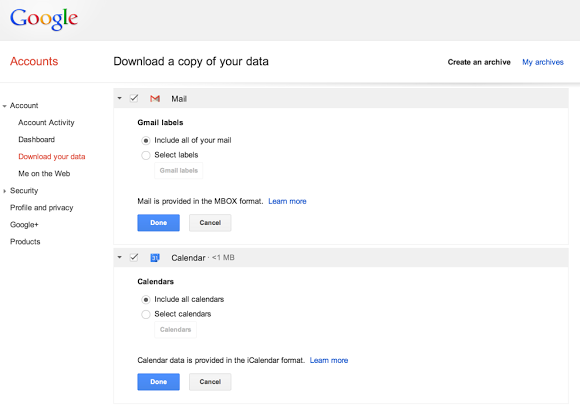

"You can download all of your mail and calendars or choose a subset of labels and calendars. You can also download a single archive file for multiple products with a copy of your Gmail, Calendar, Google+, YouTube, Drive, and other Google data," informs Google.

Baca Selengkapnya ....

Export Google Latitude Friends

Posted by Unknown Rabu, 10 Juli 2013 0 komentar
Google Latitude has been discontinued and a help center article offers more information about this. Unfortunately, there's something inaccurate: "you can't export your friend information out of Latitude".

Well, you can export your Latitude friends because they're added to a hidden Gmail group. Here's how to do that:

1. go to this Google Contacts page

2. select all contacts

3. click "More", then "Export" and click the "Export" button. You'll get a CSV file with all your Latitude friends.


4. (optional) import the contacts to Google+ and use location sharing - Google's Latitude replacement. Go to the People section in Google+, click "connect services" in the left sidebar, select "open address book" and pick the CSV file you've exported. You'll get a list of people you can add to a new Google+ circle (let's call it Latitude). Enable location sharing at the bottom of this page and restrict it to the circle you've created: pick "Custom" and select the Latitude circle. Unfortunately, Google only shows location data on profile pages and in the Locations section of the Google+ app for Android, but that may change in the future.


"Google Latitude will be retired on August 9th, 2013. Products being retired include Google Latitude in Google Maps for Android, Latitude for iPhone, the Latitude API, the public badge, the iGoogle Gadget, and the Latitude website at maps.google.com/latitude. We'll delete your list of friends on Latitude. You won't be able to see or manage friends. Any existing friends will no longer see your location in Google Maps for mobile on Android, Latitude for iPhone, the public badge, the iGoogle Gadget, and the Latitude website at maps.google.com/latitude, if you continue to use these products," says Google.

Location History will continue to be available, since it's used by Google Maps, Google Earth and Google Now. "Google Location History is an opt-in feature that allows you to store your past Google location history and see it on a Google Map or in Google Earth. Your Location History is visible only to you." Location Reporting will also be available, since it "allows Google to periodically store and use your device's most recent location data in connection with your Google Account".

Baca Selengkapnya ....
Trik SEO Terbaru support Online Shop Baju Wanita - Original design by Bamz | Copyright of android populer.