Chromecast Game

Posted by Unknown Selasa, 03 Desember 2013 0 komentar
If you have a Chromecast and you want to try a new app that supports Google's dongle, install TicTacToe for Android or for iOS. It's a very simple game that requires 2 players and displays the results on your TV. You can install it on an Android phone or tablet, on an iPhone or iPad, but you need 2 devices to play the game.


While the game is pretty basic, it shows that Chromecast isn't just for streaming music and video. Once the Google Cast API is out of beta, you'll find a lot more interesting apps. TicTacToe is based on this sample app.

{ via Reddit }

Baca Selengkapnya ....

Personalized Embedded Google Maps

Posted by Unknown Senin, 02 Desember 2013 0 komentar
Last week, Google announced that you can now embed maps in the new Google Maps interface. Just click the gear icon at the bottom of the page and select "embed map". You can pick from the 3 sizes that are available or click "custom size" to enter your favorite width and height.


The most interesting thing about the new embeds? "This map is built for you. When you view this map on your site, you'll see your saved places on the map. Your site's visitors won't see those saved places – they'll see a map built for them." This only happens if you see your profile icon in the top right corner of the map. You can star locations in an embedded map and they'll be saved to your Google account.


"You can embed a basic map, driving directions, or a local search into your website or blog from the new Google Maps," informs Google.

Baca Selengkapnya ....

Google Santa Tracker

Posted by Unknown 0 komentar
Google no longer offers the official Santa Tracker. Last year, NORAD partnered with Microsoft and Google launched its own service. Now the Google Santa Tracker is back with cool games and nifty features that help you get into the Christmas spirit.

"On Christmas Eve we'll be proudly showcasing a preview of Santa's dashboard -- the technology that powers his sleigh during his around-the-world journey. We've received this special preview from one of Santa's many developer elves, who are hard at work in the North Pole helping Santa prepare for his big day. Santa's dashboard - featuring the latest and greatest in Google Maps technology and sleigh engineering - will allow you to follow his progress around the world, and also learn a little about some of his stops along the way. Our friendly elves have also invited you to explore Santa's village while Santa gets ready for his journey. So go ahead and explore his village, you might just find some fun activities and meet some interesting elves," informs Google.


{ via Adam Haberlach. }

Baca Selengkapnya ....

Chrome Download Tips

Posted by Unknown 0 komentar
These features aren't new, but they're pretty useful and they might help you become more productive when you download files in Google Chrome.

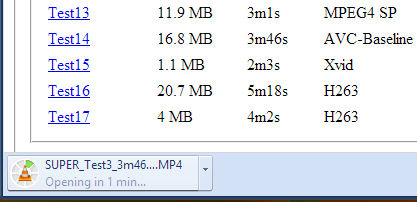
1. Do you want to open a file immediately after Chrome downloads it? You don't have to wait, just click the file in the download bar and you should see something like "opening in X minutes".


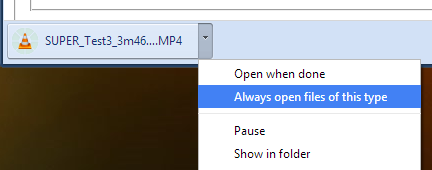
2. If you always want to open certain files after Chrome downloads them, click the arrow icon and check "always open files of this type". You can use this for .mp4 files or .torrent files, for example.


3. How to move to the desktop a file you've just downloaded? Just drag it from the download bar and drop it onto your desktop.

4. Some files open directly in Chrome: PDF documents, MP4 videos, MP3 songs. How to download them? Use a keyboard shortcut: Ctrl+S or Command-S for Mac. Another option is to right click and select "save as". You can also right click the link to the file and select "save link as".

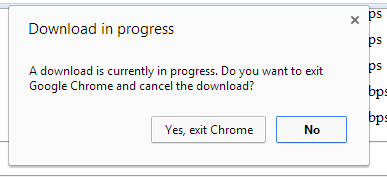
5. Don't worry about closing the Chrome window accidentally while downloading some files. Chrome shows a warning: "download in progress".


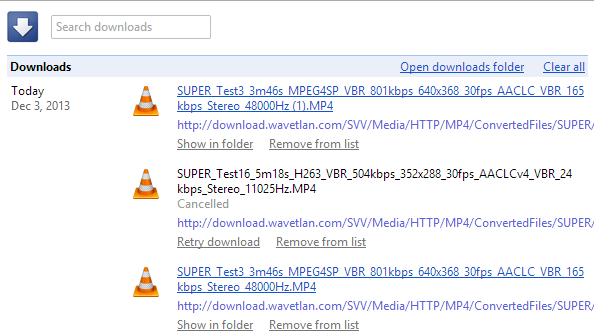
6. Manage your downloads by clicking "Downloads" in the Chrome or pressing Ctrl+J (Command-J for Mac). Use the search box to find a file you've downloaded last month, right-click the URL and you can copy it, click "Show in folder" to locate the file. You can also clear all the downloads.


Baca Selengkapnya ....

More Search Results in the New Google Maps

Posted by Unknown 0 komentar
The new Google Maps for desktop updated the local search card and now shows the top 3 results instead of only one. You can still go to the list of top results or check the results from the map, but the card is more convenient. Google is the king of search, so people expect to find a hierarchy. The list of top results is one click away, but many people will never find it.


{ via Jérôme }

Baca Selengkapnya ....

My Google?

Posted by Unknown 0 komentar
iGoogle has been discontinued, it's time for My Google. It's not clear what's behind this new service or if it will ever be released, but one thing it's clear: a Chromium bug report from a Google employee included a few links to some articles from Google's help centers. One of the links is: https://support.google.com/mygoogle/answer/3151281?hl=en&ref_topic=3148584 and there's a reference to "MyGoogle".


Clicking the link sends you to a 403 error page: "Your client does not have permission to get URL from this server". You get a 404 error page if the page doesn't exist, so this is different.


It's likely that the My Google help center is only available for Google employees, since the service hasn't been released yet. The Chromium bug report included links to the following Google help centers: MyGoogle, Google+, Google Maps, Google Search and YouTube, so the new service could be important.

"My" suggests that you'll be able to personalize Google. iGoogle, My Yahoo, My MSN focused on personalized homepages, but Google moved away from this model and started to focus on pushing content when it's likely to be useful (Google Now).

Maybe it's about Google Now, maybe it's another attempt at personalizing search results, maybe it's a way to manage preferences for all Google services. What's your take?

Update: Will Norris, from Google, says that it's "nothing quite that exciting. Just internal HR stuff."

{ Thanks, Florian K. }

Baca Selengkapnya ....

The value of openness in Android security

Posted by Unknown 0 komentar
If you use an Android phone or tablet, there are a lot of benefits that come from Android’s open nature--customization and choice are the most obvious. But an often overlooked benefit of openness is security: by developing in the open, anyone can check Android’s code to verify that it’s trustworthy or discover areas where it can be improved. Furthermore, the security community can even write code to make Android stronger and protect it against unrealized attacks.

Google has always worked closely with the security industry to make the products you use safer and more secure, and we wanted to highlight a few recent examples of that cooperation on Android:

  • Android, now part of the Google Patch Reward Program: That’s right, Google actually pays developers when they contribute security-related patches to popular open source projects, and Android is now a part of this program. As a user, this means that you have the broader security community looking out for you and preventing possible threats, before they are acted upon. 
  • Security improvements in Android 4.4, from the community: In Android 4.4, we reinforced the Android sandbox (which prevents applications from extending outside of their own area and damaging other parts of a device) by putting SELinux into enforcing mode, providing one of the strongest security systems available. The core of SELinux, as well as many of the Android specific extensions have been contributed by third-parties through open source, an example of real security improvements from the community you can use today. 
  • Pwn2Own Mobile, with Android: Android was a contributor to the bounty in this year’s PacSec Security conference, where teams of security researchers tried to exploit popular mobile devices. And while no exploit was found in Android on the Nexus devices provided, we were ready and waiting to create a patch in the event of an exploit! 
The Android team works very closely with the security research community at large to foster public discussions and implement improvements such as the ones above. This openness has helped make the Android phone or tablet you carry with you everyday much more secure.

Posted by Adrian Ludwig, Android Security Engineer

Baca Selengkapnya ....
Trik SEO Terbaru support Online Shop Baju Wanita - Original design by Bamz | Copyright of android populer.